vBulletin 4.x Topic Reply Notification Plugin
PostPosted: 22 Feb 2011, 04:21
I couldn't find one readily available, so thought I would take it upon myself to create one :)
This plugin should be active for any threads where the user has requested to receive instant email notifications (this means it should also obey the rules about not sending two notifications if the user hasn't viewed the thread yet). Who knows, I might make a proper product where users can turn this off individually, we'll see how many people would be interested :)
I was going to make a plugin XML you can just import into vB but realised your notification type may differ to mine.
Firstly add the Notification in your ArrowChat admin control panel using the following code (or modify to suit your tastes, mine's based on the "new_facebook_full" theme):
Notes:
Replace /{misc2} with the path to your forums, for example if you were mydomain.com/forums/ it would be: /forums/{misc2}
Make a note of the type ID you are given for the next stage
Then to add the plugin to vBulletin:
Go to: AdminCP > Plugin & Products > Add New Plugin
Product: vBulletin
Hook Location: newpost_notification_message
Title: Arrowchat Topic Reply Notification
Execution Order: Leave this as default
Plugin PHP Code:
You need to edit $arrowchat_alert_type_id to match the type ID given when you added the notification
Plugin is Active: Yes
Give it a test, but if all goes well, your users should receive notifications!
Just a warning I suppose, as this adds an entry for each user subscribed to each thread, this could add a bit of database load if there are hundreds of users subscribed to a thread, but I can't really think of an easier way around it!
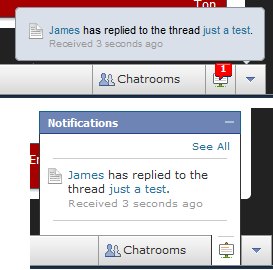
Screenshots of it in action:
Any questions, ask away :)
James.
This plugin should be active for any threads where the user has requested to receive instant email notifications (this means it should also obey the rules about not sending two notifications if the user hasn't viewed the thread yet). Who knows, I might make a proper product where users can turn this off individually, we'll see how many people would be interested :)
I was going to make a plugin XML you can just import into vB but realised your notification type may differ to mine.
Firstly add the Notification in your ArrowChat admin control panel using the following code (or modify to suit your tastes, mine's based on the "new_facebook_full" theme):
- Code: Select all
<div class="arrowchat_notification_box arrowchat_blue_link">
   <img src="/arrowchat/themes/new_facebook_full/images/icons/notification_wall_post.png" class="arrowchat_notification_icon" />
   <a href="#">{author_name}</a> has replied to the thread <a href="/{misc2}">{misc1}</a>.<br />
   <div class="arrowchat_received">Received {longago}</div>
</div>
<div class="arrowchat_notifications_divider"></div>
Notes:
Replace /{misc2} with the path to your forums, for example if you were mydomain.com/forums/ it would be: /forums/{misc2}
Make a note of the type ID you are given for the next stage
Then to add the plugin to vBulletin:
Go to: AdminCP > Plugin & Products > Add New Plugin
Product: vBulletin
Hook Location: newpost_notification_message
Title: Arrowchat Topic Reply Notification
Execution Order: Leave this as default
Plugin PHP Code:
- Code: Select all
/* ARROWCHAT TOPIC REPLY NOTIFICATION - BY JAMES HARLAND */
$arrowchat_alert_type_id = 4; // Enter your Type Number here, this needs to be correct to use the correct template!

/* YOU SHOULDNT NEED TO EDIT BELOW THIS LINE */
   $vbulletin->db->query_write("
      INSERT INTO arrowchat_notifications
         (to_id, author_id, author_name, type, alert_time, misc1, misc2)
      VALUES
         ('".$touser[userid]."', '".$vbulletin->userinfo[userid]."', '".$vbulletin->userinfo[username]."', '".$arrowchat_alert_type_id."', '".time()."', '".mysql_real_escape_string($threadinfo[title])."'  ,'".$threadlink."')
      ");
/* END ARROWCHAT TOPIC REPLY NOTIFICATION */
You need to edit $arrowchat_alert_type_id to match the type ID given when you added the notification
Plugin is Active: Yes
Give it a test, but if all goes well, your users should receive notifications!
Just a warning I suppose, as this adds an entry for each user subscribed to each thread, this could add a bit of database load if there are hundreds of users subscribed to a thread, but I can't really think of an easier way around it!
Screenshots of it in action:
Any questions, ask away :)
James.